
A practical how-to, for sharing data between plotting devices. Another interim technical post.
Warning ⚠️ If you’re not actively cruising and have no interest in Garmin chart plotters nor plotting routes then you might want to skip this blog post. It’ll be a bore. I find this method extremely useful, and wish we learned it sooner, and so hopefully others might find useful as well.
Call me crazy but we often employed two different plotting devices mounted at the helm…
Our go-to passage planning app is now Aquamaps on the iPad. No, we pay for the app and get no endorsement – hence no link. I’ve settled into this routine for a couple years now. And until something better comes along, or they keep jacking up the price…
Initially recommended by a friend (thank you again, Nic W), we started using Aquamap for safer and more informative navigation through the ICW in North Carolina and Virginia. Becoming quickly addicted to the relatively low cost and high map quality, we couldn’t put it down. However, since we employ a complete Garmin electronics package on Fayaway, we’d simply mount the iPad at the helm in addition to using Garmin as secondary and for programming the autopilot. Call me crazy but we often employed two different plotting devices mounted at the helm especially during questionable navigational locations such as the ICW. That was then.

Then two years ago, while preparing for a passage from Puerto Real en route to Great Inagua we purchased the Bahamas Explorer Charts plugin for Aquamap, as Explorer paper charts have proven to be extremely accurate in the shallower Bahamian passages. Aside from a few extraneous glitches near the Ragged Island outskirts, these electronic charts have become essential for Bahamian navigation.
Coincidentally, upon my investigating the aforementioned glitches, I was told by Aquamap endorser Carolyn (of the Boat Galley) about a nifty hack to eliminate the necessity of two plotters at the helm. (Thank you Carolyn!)
Carolyn explained that I could easily transfer routes and waypoints from Aquamap directly to our Garmin plotter. Wow!
Without further ado… here are the steps illustrated. (Note: You’ll also need the ActiveCaptain app to communicate via WiFi with your later-model Garmin chart plotter.)
Begin by first getting another cup of coffee, relaxing and then opening (or creating a new) route with Aquamap. Once applying an obvious name, tweaking to satisfaction and saved… (take the following steps; expand the photos to see the button location).

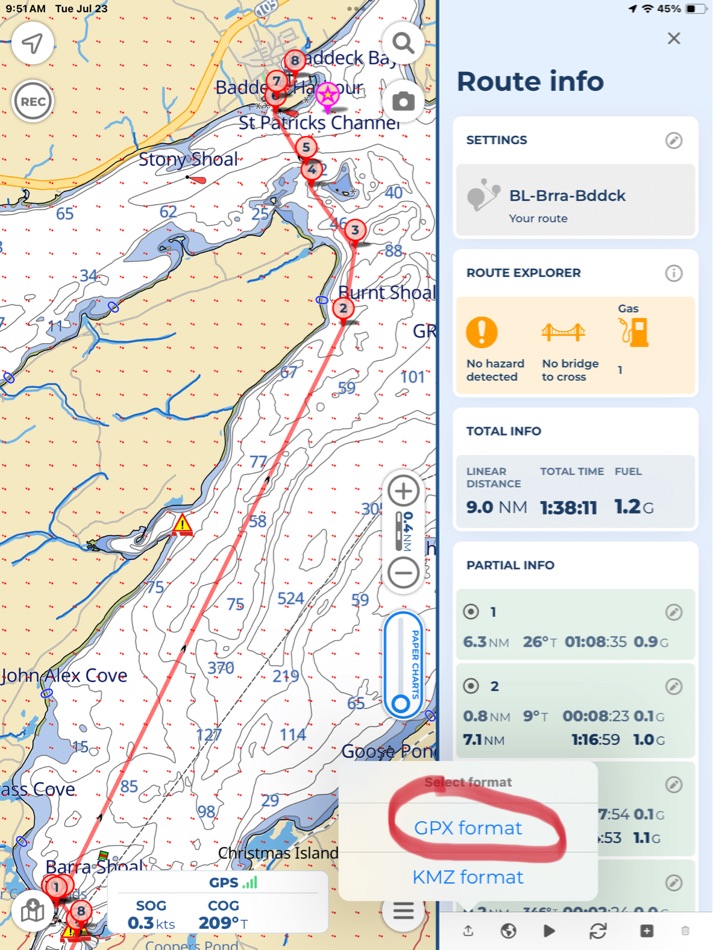


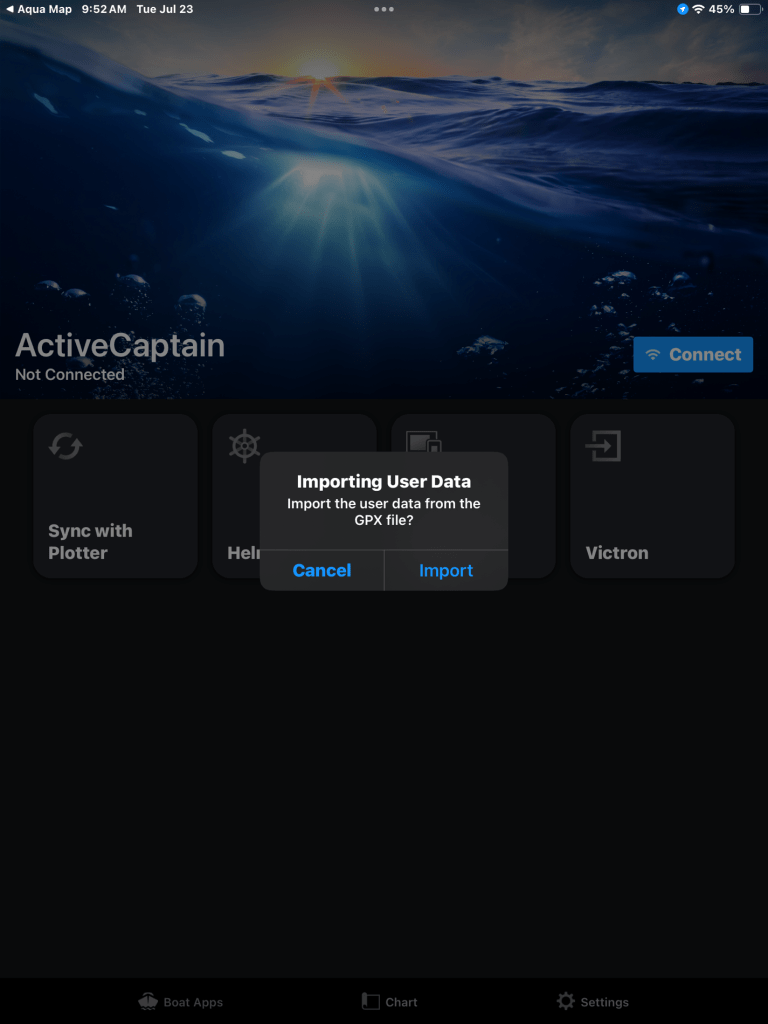

Now assuming that all went well, use the ActiveCaptain app to sync “user data” to your Garmin plotter. (Consult plotter manual as this also involves a few steps to get connected and load routes). Then you can find your route listed in the plotter, as though it was created there. Once you do this a few times the process becomes quite simple and routine.
I hope you find this as helpful as we have!
Happy Cruising!
More Details of system used on Fayaway:
- Two Garmin networked plotters, 743 (helm) and 8610 (nav station). They’re connected by an Ethernet cable. The 8600 has a WiFi hotspot feature enabled for communication to/from the iPad via ActiveCaptain app. All user data, waypoints and routes are shared between the plotters, but could be individually uploaded if necessary.
- iPad is a 7 yr old “Air” with built-in GPS (not WiFi). (Any ipad with “cellular” capabilities has this feature without needing to be activated with a simm card). ActiveCaptain app used also for updates to Garmin system via WiFi.
 SV Fayaway
awesome! Thanks for sharing Chris.
LikeLiked by 1 person
I had been using iSailor for years but switched to AquaMaps last year and love it. The Bahamian charts were clearly better, the community networks better, the interface is better and using a simple Arduino processor, I connected by NMEA network to WiFi to get AIS on my iPad within AquaMaps. If my Raymarine equipment weren’t so old, I could get depth and wind too, but that will come in time after some boat units get put that way. Running the iPad and the old Raymarine chart plotter gives two versions of the truth which can occasionally be a good warning that something is amiss. Being able to plot routes on the iPad while off the boat is great for planning purposes. Moving those routes to your Garmin chart plotter is a very good idea for added redundancy. I have to admit to still also using paper charts for passages in less familiar areas. The power consumption of the paper charts can’t be beat!
LikeLiked by 1 person
Good point about how it’s sometimes helpful to cross-check different map sources in questionable areas. We did this when first using the above method plotting courses through the Bahamas. In many cases the Garmin maps are very conservative and show excessively shallow areas. Once learning to trust Aquamap and Explorer, I’d just sail right over the shoals 🙂 well it’s still good to be careful, especially in the Bahamas!
LikeLike
Chris,
An alternative procedure pthat I use rather than the syncing is to export the GPX file from aquamaps to a “tracks and routes” folder on my ipad file system (in my case icloud) and from there I import wherever (iphone, different chartplotters and even send to others(mainly tracks of difficult areas)
I have an old E125 Raymarine which is somewhat temperamental with regard to syncing plus all programs have to be current.
PS Putting in file system also a good. Back up.
Nic W
LikeLiked by 1 person
Thanks, another good method 👍
LikeLike
Hi Chris,
I hope that you and Kelly are doing well. I always enjoy reading your posts and following your progress. This post really resonated with me. Eight years ago, I began dabbling with the Navionics app on my iPhone as my Raymarine MFD kept overheating on me and shutting down at the worst possible time. I found that the app was far more intuitive than the Raymarine system and chart updates were instant. When we sold our Sabre (Hooligan) and bought our current boat (Growler) 4 years ago, the Raymarine radar was not working, and our Garmin 4210 plotter needed a chart chip for the New England coast ($450) and would also cut out sporadically on us.
During our first season on Growler we decided to go 100% Navionics on the same type of iPad as yours. I also found that Furuno has a radar system (First Watch) that streams radar wirelessly to IOS devices. It is not a feature-packed radar system, but it is miles ahead of what I have had on past boats and the cost was less than $1,000! Perfect for the type of boating that we do! It also has an overlay feature, but you have to have the TZiBoat navigation app downloaded. This app is just ok and is not as advanced as Navionics or AquaMaps.
Redundancy has always been a concern for me and using my iPhone for this has not been fun. This season I decided to invest in a second iPad. I found a refurbished one on Amazon for $199. It has been an amazing upgrade from the original iPads that I bought new 4 years ago. Now, the only instruments that I have on my bridge are my compass, depth sounder, VHF and my iPad. I will never go back!! I truly believe that this will be the future of navigation if the hardware manufacturers allow it.
Thanks again for your posts and I look forward to seeing again at the AYC.
Best,
Paul.
Paul LeMaitre
Rear Commodore
American Yacht Club
978-701-3325
Order AYC Merch at our online Chandlery!
https://americanyachtclubstore.secure-decoration.comhttps://americanyachtclubstore.secure-decoration.com/
[cid:2e73db53-afe4-4642-b601-94afcdc6dd29]
LikeLiked by 1 person
Thanks for the note Paul. Yeah, can’t agree more that the iPad is an amazing tool that bridges all the gaps with navigation software. I’m running a new (to me) weather routing app on this passage, which also exports to Garmin via GPX. Amazing stuff.
Only negative is that for us in the sunlight it’s really difficult to see the screen.
The “older” Air version we use now (typing this message on it now, sending via Starlink about 75nm SE of Cape Sable) is fully loaded, but we have our thoughts to having a backup since it is used constantly. Constant use and never a glitch says something for the overall quality. (Hopefully I didn’t jinx it 😉
Hoping your summer is going well! We’re on our way back to Newburyport now. See ya soon!
LikeLike